logo
Courses
    logo
  • Courses
  • Corporate Training
  • Testimonials
logo

Address

Suite 610 - The Business Center, Opp to Burjuman Centre, Adjacent to Burjuman Metro Station Exit 4, Khalid Bin Walid Street. P.O.Box: 94743 Dubai, UAE

Quick Links

  • About Us
  • Blog
  • Corporate Training
  • Contact Us
  • LP Talks
  • Student Login
  • Privacy Policy
  • Terms and Conditions
  • Refund Policy
  • Pay Now

Contact us

  • info@learnerspoint.org
  • +971 (04) 4038000
  • 800SKILL(75455)
  • +1 347 637 6133
  • +44 20 4524 4199
  • +966112036111
  • +91 97462 22034
  • +971566335515

Stay connected

Privacy Policy

Revit Structure Course

24-hour training led by industry professionals

15 in-depth modules with real time projects

Get prepared for Autodesk’s Certified Professional exams

Gain access to study materials & mock tests

Receive a KHDA-approved professional certificate

Flexible training available

4.85/5

6448 Enrolled

Overview

What you will acquire from our training:

  • Complete understanding of Autodesk Revit Structure software & Building Information Modelling (BIM)
  • Understand fundamental drawing and editing tools on Revit Structure
  • Learn to create analytical models & annotate construction documents
  • Guidance on creating full 3D structural project models and set them up in working drawings
  • Career mentorship & guidance in acquiring the Autodesk Revit Structure certificate

Learning Objectives

After finishing the course, you will excel at:

  • 1

    Learn the concepts of Building Information Modelling (BIM) and how to use Autodesk Revit for creating building projects

  • 2

    Effectively create sketch and modify building components using general sketching tools for accurate and detailed models

  • 3

    Grasp model structural elements like grids, columns, foundations, framing and slabs

  • 4

    Understand how to work with different views in Revit and set view displays

  • 5

    Create schedules to extract essential project information and prepare projects for structural analysis and construction

  • objective-image

    Ready to get started?

  • Prerequisites

    Before enrolling in the Revit Structure Course, the eligibility requirements are as follows:

    • Having basic computer handling skills
    • Architectural design, drafting, or engineer­ing expertise is highly recommended

    Overall ratings by our students

    Upcoming sessions

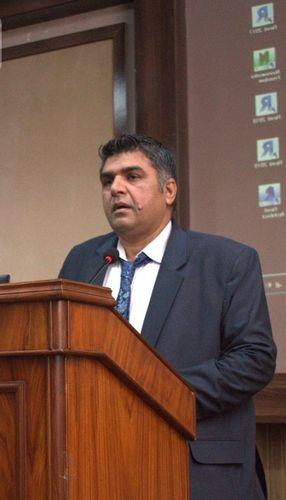
    Syed Iqrar Ali Shah

    Syed Iqrar Ali Shah is a highly experienced CG artist and Graphic Designer with over 27 years in the industry. Proficient in REVIT, AutoCAD, 3Ds Max, V-Ray, and Photoshop, he is renowned for his exceptional communication skills, confidence, and artistic expertise.

    Mr. Shah’s problem-solving abilities and meticulous attention to detail enable him to address complex design challenges effectively. He is also skilled in After-Effects, Illustrator, and InDesign and possesses a robust background in 2D and 3D visualization and training.

    His experience in both design and instruction makes him an ideal candidate for roles that require advanced technical skills and the ability to mentor others.

    Core Competencies:

    • 3D Visualisation and Post Production
    • Entertainment Special Effects
    • Architectural Broadcast Design
    • Product Motion Graphics
    • Editing & Compositing

    Professional Qualification:

    • Bachelor in Multimedia Sciences
    • Advanced Diploma in Multimedia Sciences
    Syed Iqrar Ali Shah

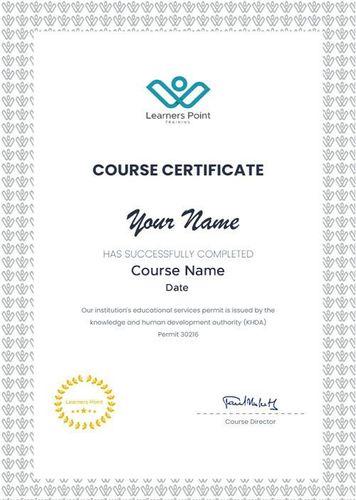
    Learners Point Certificate

    Earn a Course Completion Certificate, an official Learners Point credential that confirms that you have successfully completed a course with us.

    Certifcate-Image0

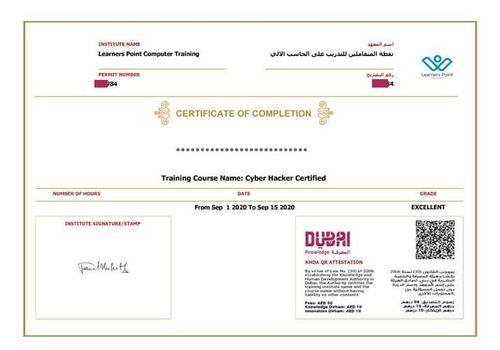
    KHDA Certificate

    Earn a KHDA attested Course Certificate. The Knowledge and Human Development Authority (KHDA) is the educational quality assurance and regulatory authority of the Government of Dubai, United Arab Emirates.

    Certifcate-Image1

    Related courses

    Curriculum

    • BIM and Autodesk Revit
    • Overview of the Interface
    • Starting Projects
    • Viewing Commands
    • Editing Elements
    • Working with Basic Modify Tools
    • Working with Additional Modify Tools
    • Linking in Revit Models
    • Setting Up Levels
    • Copying and Monitoring Elements
    • Coordinating Linked Models
    • Placing Structural Columns
    • Adding Wall Footings
    • Creating Piers and Pilasters
    • Adding Isolated Footings
    • Modifying Structural Framing
    • Adding Trusses
    • Duplicating Views
    • Adding Callout Views
    • Elevations and Sections
    • Creating Shaft Openings
    • Adding Rebar
    • Modifying Rebar
    • Reinforcing Walls, Floors, and Slabs
    • Viewing Analytical Models
    • Adjusting Analytical Models
    • Placing Loads
    • Create Foundation Elements
    • Frame a Concrete Structure
    • Placing and Modifying Views on Sheets
    • Printing Sheets
    • Working with Text
    • Adding Tags
    • Adding Detail Lines and Symbols
    • Adding Detail Components
    • Annotating Details
    • Graphical Column Schedules
    • Working with Schedules

    Frequently asked questions

    The Revit Structure Course is a specialized training program focused on teaching professionals how to use Autodesk Revit software for structural engineering and building design. It helps to gain expertise in creating detailed 3D structural models using BIM (Building Information Modelling).

    This Revit Structure Training is designed for professionals wanting to master the essentials of structural modeling using Revit. This Revit training is ideal for:

    1) Civil engineers
    2) Structural draftsmen
    3) Architects
    4) BIM modelers

    No, there are no prerequisites to enrol in this Revit Structure Course. However, prior to enrolling in our training, prior experience and knowledge in architectural design, drafting, or engineering expertise is highly recommended for candidates to understand concepts better.

    It is a great choice to enrol in a Revit Structure Course as it enables you to enhance your constructional designing skills. The rising number of infrastructure projects using advanced technologies have redefined production and design and increased the demand for BIM skills in job markets. This opens doors to a wide range of job opportunities in this domain.

    As a result of the increasing popularity of structural engineering, Revit Structure skills are very much in demand nowadays. The credibility of professionals with Revit Structure certification to create construction documentation, shop drawings and fabrication drawings efficiently make them in great demand in the UAE and stand out from the rest.

    The Revit Structure Course trains professionals on the concepts and principles of building design through construction documentation using the Autodesk Revit. With the growing demand for 3D modeling in the AEC industry, this Revit course is a necessity for professionals to stay relevant in the field. Thus making this Revit Structure training an added value and help participants land high-paying jobs.

    The Revit training sessions at Learners Point are interactive, immersive, and intensive hands-on programs. We offer 3 modes of delivery and participants can choose from instructor-led classroom-based group coaching, one-to-one training session, or high-quality live and interactive online sessions as per convenience.

    At Learners Point, if a participant doesn’t wish to proceed with the training after the registration due to any reason, he or she is entitled to a 100% refund. However, the refund will be issued only if we are notified in writing within 2 days from the date of registration. The refund will be processed within 4 weeks from the day of exit.

    Do you want to learn more about Learners Point Academy?

    • Learn more about courses
    • Understand about our methodology
    • Let’s talk about Corporate trainings
    • Anything else that you want to know, we are here for you!

    Let's chat!

    • Afghanistan+93
    • Albania+355
    • Algeria+213
    • Andorra+376
    • Angola+244
    • Antigua and Barbuda+1268
    • Argentina+54
    • Armenia+374
    • Aruba+297
    • Australia+61
    • Austria+43
    • Azerbaijan+994
    • Bahamas+1242
    • Bahrain+973
    • Bangladesh+880
    • Barbados+1246
    • Belarus+375
    • Belgium+32
    • Belize+501
    • Benin+229
    • Bhutan+975
    • Bolivia+591
    • Bosnia and Herzegovina+387
    • Botswana+267
    • Brazil+55
    • British Indian Ocean Territory+246
    • Brunei+673
    • Bulgaria+359
    • Burkina Faso+226
    • Burundi+257
    • Cambodia+855
    • Cameroon+237
    • Canada+1
    • Cape Verde+238
    • Caribbean Netherlands+599
    • Cayman Islands+1
    • Central African Republic+236
    • Chad+235
    • Chile+56
    • China+86
    • Colombia+57
    • Comoros+269
    • Congo+243
    • Congo+242
    • Costa Rica+506
    • Côte d'Ivoire+225
    • Croatia+385
    • Cuba+53
    • Curaçao+599
    • Cyprus+357
    • Czech Republic+420
    • Denmark+45
    • Djibouti+253
    • Dominica+1767
    • Dominican Republic+1
    • Ecuador+593
    • Egypt+20
    • El Salvador+503
    • Equatorial Guinea+240
    • Eritrea+291
    • Estonia+372
    • Ethiopia+251
    • Fiji+679
    • Finland+358
    • France+33
    • French Guiana+594
    • French Polynesia+689
    • Gabon+241
    • Gambia+220
    • Georgia+995
    • Germany+49
    • Ghana+233
    • Greece+30
    • Greenland+299
    • Grenada+1473
    • Guadeloupe+590
    • Guam+1671
    • Guatemala+502
    • Guinea+224
    • Guinea-Bissau+245
    • Guyana+592
    • Haiti+509
    • Honduras+504
    • Hong Kong+852
    • Hungary+36
    • Iceland+354
    • India+91
    • Indonesia+62
    • Iran+98
    • Iraq+964
    • Ireland+353
    • Israel+972
    • Italy+39
    • Jamaica+1876
    • Japan+81
    • Jordan+962
    • Kazakhstan+7
    • Kenya+254
    • Kiribati+686
    • Kosovo+383
    • Kuwait+965
    • Kyrgyzstan+996
    • Laos+856
    • Latvia+371
    • Lebanon+961
    • Lesotho+266
    • Liberia+231
    • Libya+218
    • Liechtenstein+423
    • Lithuania+370
    • Luxembourg+352
    • Macau+853
    • Macedonia+389
    • Madagascar+261
    • Malawi+265
    • Malaysia+60
    • Maldives+960
    • Mali+223
    • Malta+356
    • Marshall Islands+692
    • Martinique+596
    • Mauritania+222
    • Mauritius+230
    • Mexico+52
    • Micronesia+691
    • Moldova+373
    • Monaco+377
    • Mongolia+976
    • Montenegro+382
    • Morocco+212
    • Mozambique+258
    • Myanmar+95
    • Namibia+264
    • Nauru+674
    • Nepal+977
    • Netherlands+31
    • New Caledonia+687
    • New Zealand+64
    • Nicaragua+505
    • Niger+227
    • Nigeria+234
    • North Korea+850
    • Norway+47
    • Oman+968
    • Pakistan+92
    • Palau+680
    • Palestine+970
    • Panama+507
    • Papua New Guinea+675
    • Paraguay+595
    • Peru+51
    • Philippines+63
    • Poland+48
    • Portugal+351
    • Puerto Rico+1
    • Qatar+974
    • Réunion+262
    • Romania+40
    • Russia+7
    • Rwanda+250
    • Saint Kitts and Nevis+1869
    • Saint Lucia+1758
    • Saint Vincent and the Grenadines+1784
    • Samoa+685
    • San Marino+378
    • São Tomé and Príncipe+239
    • Saudi Arabia+966
    • Senegal+221
    • Serbia+381
    • Seychelles+248
    • Sierra Leone+232
    • Singapore+65
    • Slovakia+421
    • Slovenia+386
    • Solomon Islands+677
    • Somalia+252
    • South Africa+27
    • South Korea+82
    • South Sudan+211
    • Spain+34
    • Sri Lanka+94
    • Sudan+249
    • Suriname+597
    • Swaziland+268
    • Sweden+46
    • Switzerland+41
    • Syria+963
    • Taiwan+886
    • Tajikistan+992
    • Tanzania+255
    • Thailand+66
    • Timor-Leste+670
    • Togo+228
    • Tonga+676
    • Trinidad and Tobago+1868
    • Tunisia+216
    • Turkey+90
    • Turkmenistan+993
    • Tuvalu+688
    • Uganda+256
    • Ukraine+380
    • United Arab Emirates+971
    • United Kingdom+44
    • United States+1
    • Uruguay+598
    • Uzbekistan+998
    • Vanuatu+678
    • Vatican City+39
    • Venezuela+58
    • Vietnam+84
    • Yemen+967
    • Zambia+260
    • Zimbabwe+263

    Learn now, pay later

    Dive into your course now and pay in installments